 English
 Dansk
 Deutsch
 Español
 Norsk bokmål
 Svenska
Tripletex is one of the most widely used accounting systems among Norwegian trade and installation firms, and its project module covers a lot: budgets, hours, invoicing plans, subprojects and project status. So a ventilation, plumbing or electrical contractor is not really asking whether Tripletex can handle projects. The question is how best to organise project finances when purchases are large and projects run for many months.
What Tripletex does for projects
Project is included in the Komplett, Elektro and VVS packages. Stock and logistics is an add-on. In a project you can:
- Set up the project with a fixed-price or hourly-rate contract type, a category, templates and subprojects under a main project.
- Budget hours, hourly cost, fee income and order lines, and allocate hours in a resource plan.
- Use the project forecast, which according to Tripletex works when the project is budgeted in hours.
- Set an hourly cost per employee, with the option of a percentage mark-up.
- Budget expected purchases as subcontract items (underleveranser) and link the supplier invoice to the item.
- Invoice as you go, at a fixed price by progress (based on logged hours × budgeted hourly rate) or on account following an invoicing plan.
- Track project status in a dashboard with contribution margin, work done to date, uninvoiced work, hours and invoices.
Logistikk Basis adds purchase orders and goods receipts, and a purchase can be linked to a project and to the supplier invoice. For many businesses with short jobs, hours and materials, this is all they need.
An ordinary week on a ventilation project
Take a ventilation project worth NOK 4.8 million, delivered as a subcontract with your own fitters, an insulation supplier and equipment from several suppliers. Five things happen that change the forecast profit. The table shows what Tripletex can handle, what takes manual follow-up and what a project tool can add:
| Event | How Tripletex can handle it | What needs manual follow-up | What ProfitTracker can add |
|---|---|---|---|
| Monday: the supplier says call-off 3 of ductwork will arrive two weeks late | With Logistikk Basis, the purchase can be registered, linked to the project and received with a goods receipt when the goods arrive. | New delivery date and what it means for progress and payments. | Expected delivery date per purchase order; the delay shows, and the cash flow moves with it. |
| Tuesday: the insulation is let for 336,000 against 300,000 in the budget | Subcontract items let you budget expected purchases on the project, and the supplier invoice is linked to the item. | Seeing the variance against the budget line before the first invoice is posted. Check how this shows in project status in your package. | The contract as a purchase order on the budget line: 336,000 shows as Committed, and the −36,000 variance shows the same day. |
| Wednesday: a drawing revision creates extra work, and the client is notified of the change | Additional work can be set up as a subproject with its own contract type and invoiced separately or together with the main project. | The 120,000 claim is notified but not approved. Status and deadlines need following up. | Approved changes as a separate sales order with milestones. Open claims still need manual follow-up. |
| Thursday: an invoice in euros for fire dampers is posted | The invoice is posted at the exchange rate, and the cost reaches the project. | How much of the order is still open in euros. | The balance on the purchase order is converted at today’s rate in the forecast. |
| Friday: the project manager raises remaining installation hours from 480 to 600 | The project forecast builds on the hours budget, and hourly cost per employee can be set with a percentage mark-up. | Updating the estimate and seeing what it does to the result. | Remaining hours = estimate minus logged hours. The new estimate lowers forecast profit by NOK 74,400. |
By the end of the week, forecast profit has dropped by more than NOK 100,000. Much of this is manageable in Tripletex, but several of these events only show in the accounts once the invoices are posted, or have to be tracked in a spreadsheet on the side.
Purchase orders and subcontract items in Tripletex
Tripletex has two ways of handling purchases on a project. Subcontract items are used to budget expected purchases on the project, and the supplier invoice is linked to the item through order lines. Purchase orders (Logistikk Basis) are used to order, receive goods and link the purchase to a project and to the supplier invoice. A purchase order does not change stock levels; the goods receipt does.
What we have not found described in the help centre is how an open purchase order shows in project status before the invoice is posted. That does not mean it cannot be done. Check it for your package, or ask Tripletex. This is the figure that lets you see forecast final cost before the invoices arrive.
On-account invoicing on the project and the accounting policy
Tripletex recommends on-account invoicing following an invoicing plan on fixed-price projects. On-account amounts are held on the balance sheet and recognised as revenue when the project’s final invoice is issued. That is how on-account invoicing is handled in the project module and the bookkeeping during the year.
Which accounting policy the company follows in its annual accounts is a separate decision. The main rule is the percentage-of-completion method under NRS 2, while small companies can choose the completed contract method under NRS 8. The choice is made with your auditor and handled at the period and year-end close. For the project manager, it is useful either way to know how much of the forecast profit has been earned and how much remains. Read more in our article on project accounting and revenue by progress.
Where the data should live
The simplest rule is that each piece of information is entered in one place, by whoever has it, and mirrored to wherever it is needed:
| Data | Where it should live | Why |
|---|---|---|
| Posted entries, supplier invoices, customer invoices | The accounts | Statutory documentation. One source of truth for what has been posted. |
| Project, customer, supplier | Both, synchronised | Created in one place and mirrored. Entering data twice is the most common source of errors. |
| Budget per line and forecast | The project tool | Changed weekly by the project manager. Needs a history: original, current, forecast. |
| Purchase orders and goods receipts | The project tool (or a logistics module) | Must be linked to the project and budget line to give committed cost. |
| Hours | Timesheet system or accounting software | Labour cost has to reach the project as you go, not when payroll runs. |
| Invoicing plan and changes | The project tool | The customer invoice is created in one place and transferred to the accounts. |
A project setup in Tripletex that stands up to audit
Bokføringsforskriften (the Norwegian Bookkeeping Regulations) requires that costs in the project accounts can be split into wages, materials, subcontractors and other direct costs, and that contract work and changes are kept apart where that is material:
- One project per contract, with a project code on every posting and changes as subprojects, as Tripletex describes.
- A chart of accounts that adds up to the four cost groups: cost of goods, subcontracts, wages and other direct costs.
- A realistic hourly cost per employee: wages, holiday pay, pension and employer’s contributions divided by productive hours.
- An invoicing plan that follows the contract’s payment schedule.
- Timesheets per employee and day, split between projects and internal time, even on fixed price (§ 8-1-2).
Month-end close
Three items are typical at month end: goods received but not invoiced, subcontract work done but not invoiced, and hours logged but not yet paid. If they are not accrued, the project shows a better result one month and a worse one the next.
Project finances and purchasing together with Tripletex
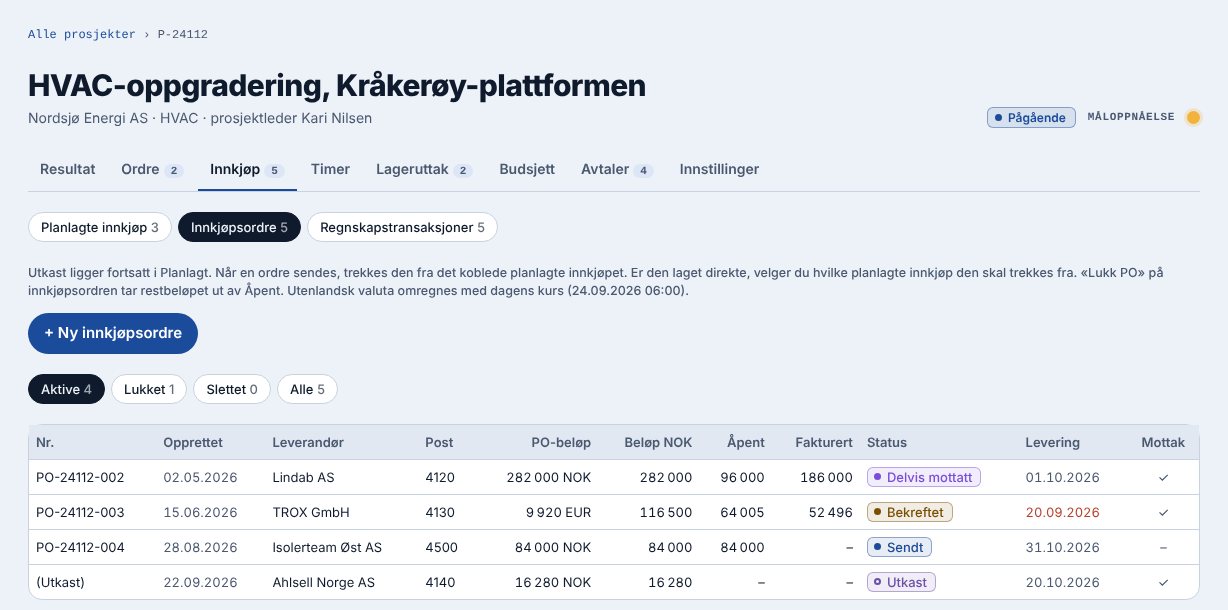
ProfitTracker builds on Tripletex rather than replacing it. Tripletex is the source of truth for the accounts; ProfitTracker is the source of truth for projects, sales orders, purchase orders and goods receipts. The project is created in ProfitTracker and can be created automatically in Tripletex. Customer invoices are created in ProfitTracker and transferred to Tripletex, and payments received are fetched back.
Posted entries on the accounts you choose for project costs are fetched from Tripletex once a day and when you press “Synchronise now”. You match the entries to the purchase order, and they become Actual while Committed falls by the same amount. Hours are fetched from Tripletex or imported from Excel.
Questions to ask before you choose a tool on top of Tripletex
- Is the project created in one place and mirrored to the other, or does it have to be entered twice?
- Which entries are fetched from Tripletex, how often, and can they be matched to a purchase order?
- Where is the customer invoice created, and does payment status come back?
- How do the hours get in, and at what hourly cost?
- What happens to an invoice in a foreign currency?
Want to see purchasing and forecast profit on your own projects, with Tripletex as your accounting software?
Sources
- Tripletex – prices and packages
- Tripletex – creating a project
- Tripletex – project budget and resource plan
- Tripletex – fees and hourly rates
- Tripletex – subcontract items, forecast and progress
- Tripletex – project dashboard
- Tripletex – additional work
- Tripletex – on-account invoicing on fixed-price projects
- Tripletex – purchase orders
- Tripletex – purchases linked to a project
- Regnskapsstiftelsen – NRS 8