 English
QuickBooks Online is the accounting system behind a large share of small and mid-sized contractors in the US, and a fair number in the UK and Australia. It can do job costing – how much depends heavily on the plan you are on, and since August 2026 also on which country you are in. This guide sets out what each plan does for a contractor, walks one job through QuickBooks, and shows the two numbers the reports still do not give you.
The short answer, by plan
| Simple Start / Essentials | Plus | Advanced | |
|---|---|---|---|
| Projects (income and cost per job) | No | Yes | Yes |
| Purchase orders | No | Yes | Yes |
| Hourly labour cost rate on projects | No | Yes | Yes |
| Project cost estimates and “Estimates vs actuals” | No | No | Yes |
| Construction features: budgets by phase, progress invoicing, WIP, change orders, committed costs | No | No | US only. Some features are documented for the Construction add-on or Intuit Enterprise Suite |
| US list price per month (renewals from 1 Aug 2026) | $38 / $85 | $140 | $340 |
Projects – the feature that groups income and costs per job – is in Plus and Advanced. Project cost estimates and the “Estimates vs actuals” report are in Advanced. In the US, Intuit has built Advanced into a construction-ready plan during 2026: project budgets by phase and cost group, progress invoicing by phase (AIA-style), change orders that update the estimate, budget and invoice when the client approves them, WIP reports and a Committed Costs report where purchase order lines are assigned to phases. Some of Intuit’s help articles describe these features for Advanced with the QuickBooks Construction add-on or for Intuit Enterprise Suite, so check what your subscription includes. Intuit has not documented the same features for the UK or Australia.
Setting up job costing in QuickBooks Online
- Turn on Projects and create one project per job, linked to the customer.
- Use products and services as cost codes. Each item carries a cost rate and a customer rate, which is what estimates are built from. Keep the list short and stable so jobs can be compared.
- Code every bill, expense and cheque to the project and item. Uncoded costs are the most common reason a job looks better than it is.
- Decide how labour gets in (see below).
- Reconcile before you read the margin. A tidy dashboard on incomplete coding is worse than no dashboard.
Labour: the line that moves margins
QuickBooks puts labour on a project in one of two ways: actual payroll expenses, or an hourly cost rate per employee set in project settings. The choice applies to all projects. Two details matter. The cost rate only applies to time tracked after it is set. And the “Project profitability” report uses payroll expense data, while the time reports always use hourly cost – so the two can disagree.
The cost rate itself is where many contractors go wrong. The wage is not the cost. Add employer payroll taxes (in the US, 6.2% Social Security up to the wage base and 1.45% Medicare, plus unemployment insurance and workers’ compensation, which can run well above 10% for some trades), benefits, and paid time that is not on a job. Divide by the hours that can actually be charged to jobs, not paid hours. A cost rate that is a few dollars too low across thousands of hours is the classic source of profit fade.
Purchase orders and committed cost
Purchase orders are available in Plus and Advanced. In the US you can add all or part of a PO to a bill, so a partial delivery is billed for what arrived, and the PO closes automatically when everything has been billed. A purchase order is a non-posting document: it does not affect the books until it becomes a bill. That is correct accounting, and it means the standard project profitability report shows what has been billed.
What has changed in 2026 is US Advanced. There, purchase order lines can be assigned to a project phase, and a Committed Costs report shows them by cost group. If you are on that plan in the US, you can see commitments inside QuickBooks. On Plus, and outside the US, Intuit does not document committed cost on projects, so open purchase orders have to be followed elsewhere.
One job, three views
Take a £560,000 HVAC fit-out on an office building, run by a mechanical subcontractor using QuickBooks Online Plus. At the end of October the job has £379,820 in actual costs. On top of that, purchase orders and the insulation subcontract worth £79,600 are open, and £68,560 of materials and labour is still to be bought or done.
The standard project report shows the first bar. The project manager needs the third. Against a contract value of £571,200, the job is heading for a margin of 7.6% – down from 11.5% at estimate. None of the decline is visible in a booked-cost report until the last bills arrive.
A set-up that works for a contractor
- One project per contract, under the customer. Change orders either on their own products/services lines or, for large changes, a separate sub-project so they can be evidenced and invoiced.
- A short products and services list as cost codes, for example: equipment, ductwork and fittings, dampers and grilles, subcontract – insulation, preliminaries, installation labour, project management, commissioning. The same list on every job.
- Classes or locations for divisions (service vs projects), not for jobs – mixing the two makes both reports harder to read.
- A labour cost rate per employee that includes burden, reviewed at least once a year.
- Bills coded at entry, not cleaned up at month-end.
Month-end in QuickBooks
QuickBooks reports are only as current as the bills in them. At month-end, three items typically need a journal on a contracting job: materials received but not yet billed (ductwork that is installed while the supplier’s bill is still in the post), subcontract work done but not yet applied for, and labour worked but not yet paid. Without them, the job looks better this month and worse the next – and if you recognise revenue on percentage of completion, progress is understated too.
Cost to complete
Intuit does not document a cost-to-complete or forecast-at-completion report in QuickBooks Online – one that adds actual cost, committed cost and what is still to buy or do into an expected final cost per job. The building blocks are there in US Advanced: budgets, Estimates vs actuals, WIP and Committed Costs. Intuit Intelligence, in beta for Advanced administrators, is described as flagging potential overruns. On other plans and in other regions, forecast at completion has to be built – in a spreadsheet, or in a tool that combines QuickBooks data with commitments and remaining cost.
Your options
- Stay in Plus if your jobs are short, mostly labour, and you invoice when done.
- Move to Advanced (US) if you want budgets, change orders, WIP and committed costs inside the ledger – and check whether the features you need require the Construction add-on.
- Add a spreadsheet for open POs and remaining cost per job – workable for a handful of jobs, fragile beyond that.
- Add a job cost tool that works alongside QuickBooks and holds budgets, commitments and forecasts. ProfitTracker is one; check what any tool synchronises, in which direction and how often.
Project costs, commitments and forecast profitability alongside QuickBooks
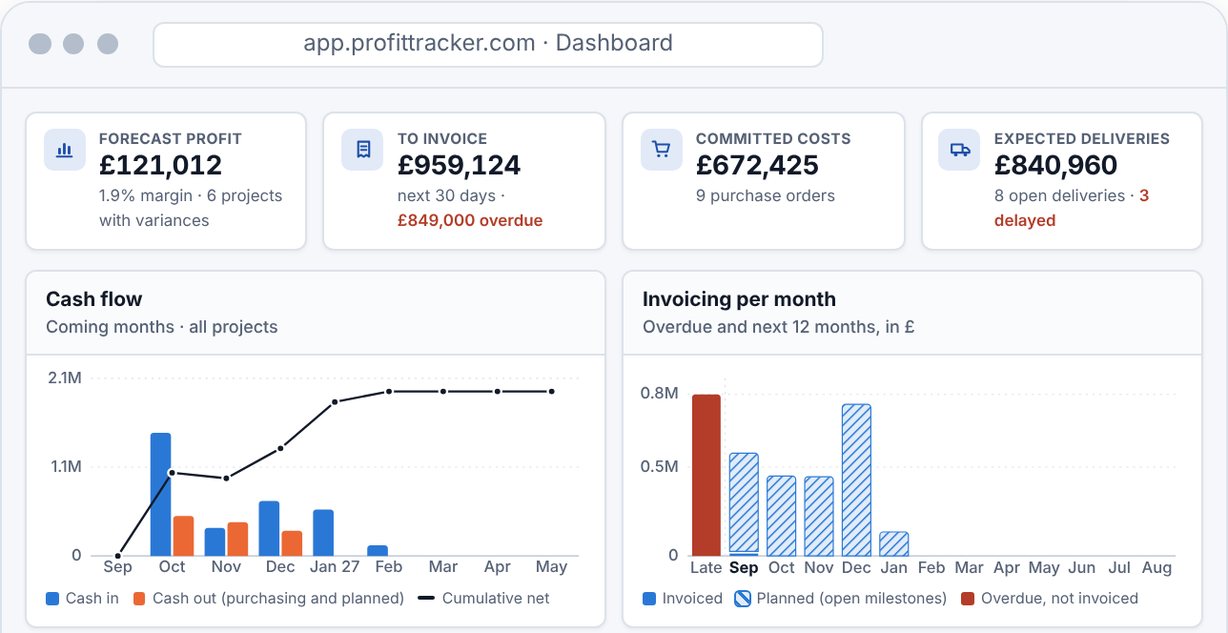
ProfitTracker works next to QuickBooks Online rather than replacing it. Per job, it shows planned + committed + incurred = forecast against the budget, with purchase orders, goods receipts and the billing plan kept in ProfitTracker, and forecast margin against target across all jobs.
Projects, customer invoices and credit notes are created in ProfitTracker and transferred to QuickBooks Online. Customers, suppliers, products and payments sync both ways, and hours are fetched from QuickBooks. The sync runs nightly and whenever you start it, so the figures are as fresh as the last sync.
Want to see committed cost and forecast margin on your own jobs, with QuickBooks Online as the ledger?
Sources
- Intuit – Projects (US)
- Intuit – Projects (UK)
- Intuit – Estimates vs actuals
- Intuit – What’s new in Advanced, Aug 2026
- Intuit – Purchase orders
- Intuit – Labour costs on projects
- Intuit – Pricing (US)
- Intuit – Price changes Aug 2026
- Intuit – Project phases
- Intuit – Cost groups
- Intuit – Change orders
- Intuit – Progress invoicing by phase
- Intuit – What’s new in Advanced, Fall 2026
- SSA – 2026 wage base